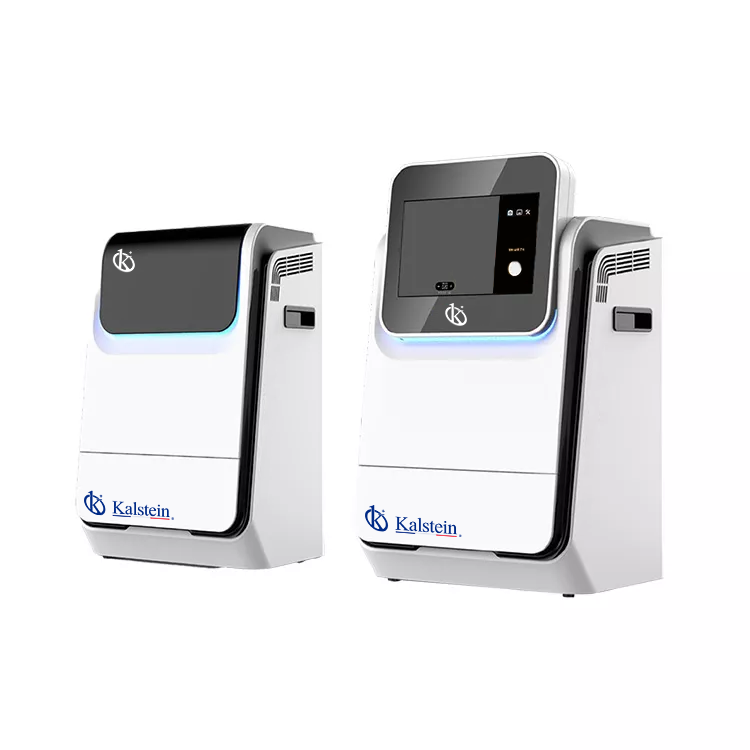
Troubleshooting Common Errors in the YR06208 Mini Multifunctional Imager
The YR06208 Mini Multifunctional Imager is a powerful tool designed for applications in chemiluminescence, fluorescence, and protein gel documentation. Despite its advanced functionalities, users may encounter various errors during operation. This guide aims to assist users in identifying and resolving common issues associated with the YR06208, enhancing overall performance and user experience.
Understanding the YR06208: Key Features
The YR06208 is renowned for its compact design and high sensitivity. It includes features such as:
- High-resolution imaging capabilities
- Intuitive software suitable for unlimited users
- Optional removable industrial computer
Technical Specifications of the YR06208
| Model | YR06208 |
|---|---|
| Brand | Kalstein |
| Category | Gel documentation |
| Price (USD) | 7286.00 |
| Weight (kg) | 17 |
| Dimensions | N/A |
| Package Size (cm) | 42 x 43 x 74 |
Common Symptoms and Troubleshooting Steps
Below, we outline common symptoms that users may encounter while operating the YR06208 and their corresponding troubleshooting steps.
Equipment Does Not Power On
If the YR06208 does not turn on, check the following:
- Power Supply: Ensure that the power cable is securely connected and the outlet is functional.
- Fuse: Inspect the fuse for any signs of damage and replace if necessary.
Error Code E-03 Appears
Error code E-03 may indicate a malfunctioning component. To address this:
- Check Connections: Ensure all cables are properly connected.
- Restart Device: Turn off the device, wait for a few moments, and power it back on.
Inconsistent Imaging Results
Inconsistent results can stem from several issues:
- Sample Quality: Ensure that samples are properly prepared and stored.
- Calibration: Check if the equipment requires recalibration.
Software Malfunctions
Software-related issues can disrupt operations. Consider the following:
- Updates: Ensure that the software is updated to the latest version.
- Reinstallation: If problems persist, reinstall the software.
Symptom Diagnosis Table
| Symptom | Possible Causes | Solutions |
|---|---|---|
| Equipment Does Not Power On | Power supply issue, damaged fuse | Check connections and replace fuse |
| Error Code E-03 | Connection issues, internal malfunction | Check cables and restart device |
| Inconsistent Imaging Results | Poor sample preparation, need for calibration | Improve sample handling and recalibrate |
| Software Malfunctions | Outdated software, improper installation | Update or reinstall software |
Frequently Asked Questions
What should I do if the YR06208 shows an error code?
Refer to the symptom diagnosis table for likely causes and solutions specific to the error code displayed.
How can I enhance the imaging quality of my YR06208?
Ensure your samples are well-prepared and consider recalibrating your device frequently to maintain optimal performance.
Is there a limit on the number of users for the YR06208 software?
No, the YR06208 features software that allows for an unlimited number of users without additional costs.
How often should I conduct maintenance on the YR06208?
Regular maintenance is advised at least once every six months, which includes checking the internal components and software updates.
Can the YR06208 be used for fluorescence imaging?
Yes, the YR06208 is capable of fluorescence imaging, making it versatile for various applications.
What accessories are compatible with the YR06208?
Optional accessories include an industrial computer and fluorescent modules that enhance the functionality of the imager.
Final Thoughts
If you are looking for a fusion of innovation and quality, you have come to the right place. At Kalstein, we offer you the luxury of exploring our exclusive catalog of laboratory equipment. We manufacture every device to the highest standards of excellence. Our intuitive and seamless online purchasing channels are designed for your convenience, securing the most competitive prices. Hesitate no longer — we bring science to life, it is time to become part of our community.