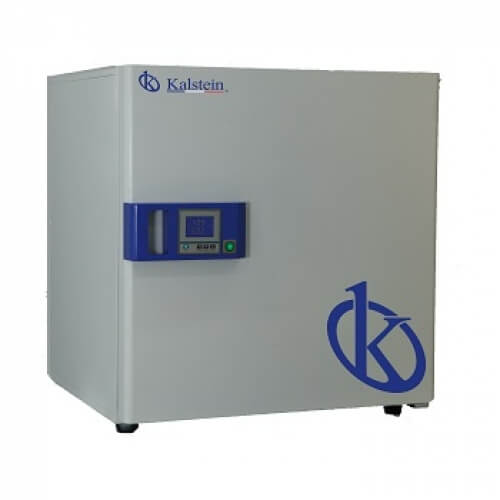
Installation and Commissioning Guide for the YR02052 Constant Temperature Incubator
The YR02052 Constant Temperature Incubator is an essential tool for modern laboratories requiring precise temperature control for various applications. This guide provides an in-depth look at the installation and commissioning process of the YR02052, ensuring that users can maximize the performance and reliability of the incubator.
Understanding the YR02052 Constant Temperature Incubator
The YR02052 model is equipped with a microcomputer-controlled PID system that ensures accurate and stable temperature regulation. It features a carbon fiber heating element and an advanced preheating method to minimize temperature fluctuations. This incubator is designed for applications in fields such as biotechnology, healthcare, and microbiology, making it crucial to understand its specifications and operation.
Technical Specifications of the YR02052
| Feature | Specification |
|---|---|
| Model | YR02052 |
| Voltage (V) | 220 |
| Temperature Range (℃) | RT + 5 ~ 65 |
| Accuracy (℃) | ± 0.1 |
| Fluctuation (%) | ± 0.2 |
| Power (kW) | 0.45 |
| Interior Volume (L) | 160 |
| Interior Dimensions (mm) | 600 × 600 × 450 |
| Total Dimensions (mm) | 800 × 750 × 700 |
| Net Weight (kg) | 57 |
| Shipping Weight (kg) | 61 |
Unboxing and Pre-Installation Checklist
Before installing the YR02052, perform the following steps:
- Carefully unbox the incubator and check for any damages during shipping.
- Verify that all accessories and components are included, such as the power cord, user manual, and any additional calibration tools.
- Ensure that the installation area is prepared following the environmental requirements outlined in the technical specifications.
Site Requirements and Environmental Conditions
The installation site for the YR02052 must meet specific environmental conditions:
- Room temperature should be kept stable, ideally between 20-25℃.
- Humidity levels should be controlled to prevent moisture accumulation inside the incubator.
- Ensure adequate ventilation around the incubator to avoid overheating.
- Check that the power supply matches the voltage specification of 220V.
Levelling and Anchoring the Incubator
Once the incubator is positioned in the designated area, it is essential to level and anchor it properly:
- Use a spirit level to check that the incubator is level from front to back and side to side.
- If necessary, adjust the feet of the incubator to ensure stability.
- Secure the incubator if it is to be installed in a location prone to vibrations.
Power-Up Sequence and Initial Calibration
After installation, follow this power-up sequence:
- Connect the power cord to a properly rated outlet.
- Press the power button to turn on the incubator.
- Set the desired temperature and allow the incubator to reach stability before placing any samples inside.
Initial calibration can be performed by comparing the displayed temperature with an external accurately calibrated thermometer. Adjust the settings as needed to account for any discrepancies.
Common Installation Mistakes to Avoid
Here are some common pitfalls during installation and setup of the YR02052:
- Not ensuring that the incubator is level, which may lead to uneven temperature distribution.
- Ignoring the environmental conditions, such as placing the unit in an area with high humidity or direct sunlight.
- Failing to perform initial calibration before use, which can compromise experimental results.
Frequently Asked Questions
What is the ideal location for the YR02052 incubator?
The ideal location for the YR02052 incubator is a stable environment with controlled temperature and humidity, away from direct sunlight and drafts, and with sufficient airflow around the unit.
How do I calibrate the YR02052 incubator?
Calibration involves comparing the incubator's temperature setting with an external calibrated thermometer. Adjust the incubator's temperature setting accordingly to ensure accurate readings.
What maintenance is required for the YR02052 incubator?
Routine maintenance includes cleaning the interior, checking the integrity of the heating elements, and ensuring that the temperature control system is functioning properly. Regular checks can prevent issues.
What are the common applications of the YR02052 incubator?
The YR02052 incubator is commonly used in microbiology, biotechnology, and health care for culturing microorganisms, maintaining cell cultures, and conducting various scientific experiments.
How do I troubleshoot heating issues with the YR02052?
If you experience heating issues, check the thermostat calibration, inspect the heating elements for damage, and ensure that the power supply is consistent and meets the required voltage.
Can I connect the YR02052 to a computer?
Yes, the YR02052 incubator features an RS485 computer interface that allows for data logging and remote monitoring, enhancing your ability to manage incubator conditions effectively.
What should I do if the incubator does not power on?
If the YR02052 does not power on, check the power supply, inspect the power cord for damage, and ensure that the unit is properly plugged into an outlet. If issues persist, consult the troubleshooting section of the user manual.
If you are looking for a fusion of innovation and quality, you have come to the right place. At Kalstein, we offer you the luxury of exploring our exclusive catalog of laboratory equipment. We manufacture every device to the highest standards of excellence. Our intuitive and seamless online purchasing channels are designed for your convenience, securing the most competitive prices. Hesitate no longer — we bring science to life, it is time to become part of our community.