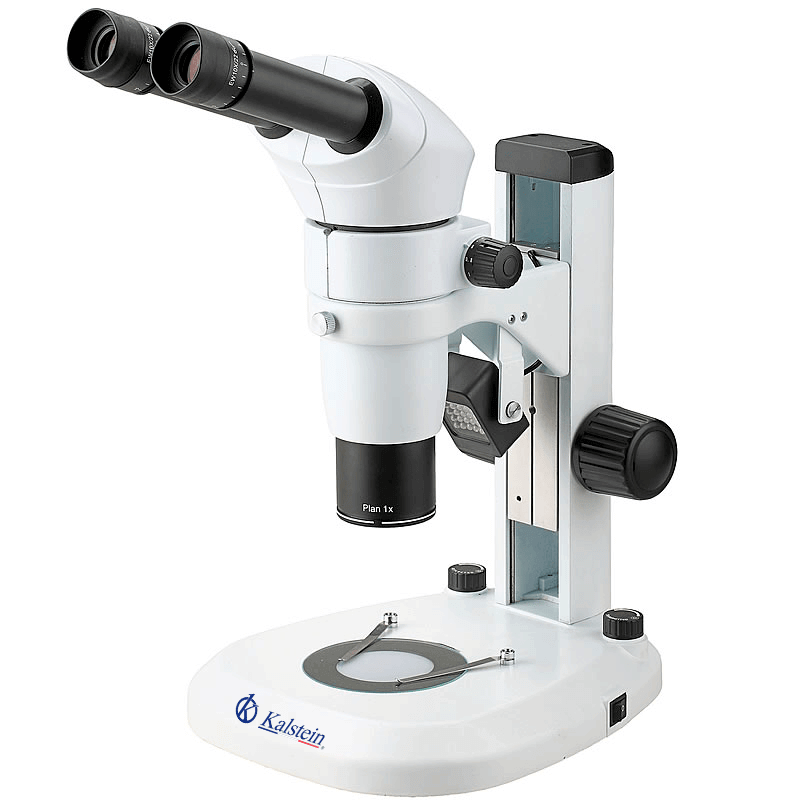
Common Errors and Troubleshooting Symptoms for the YR0246 Trinocular Microscope
The YR0246 Trinocular Microscope is recognized for its exceptional optical performance and versatile applications across scientific, industrial, and medical fields. However, like any sophisticated laboratory equipment, it may encounter various issues over time. Understanding these common errors and their troubleshooting methods is essential for maintaining optimal performance and extending the lifespan of the microscope. In this guide, we will explore frequent symptoms, probable causes, and solutions to help you resolve issues effectively.
Technical Specifications of the YR0246 Microscope
| Feature | Details |
|---|---|
| Model | YR0246 |
| Optical System | Parallel optical system, modular design for easy function addition |
| Head | Inclined binocular head with adjustable viewing angle of 0°-35° |
| Eyepiece | Extra-wide field eyepiece EWF10x/22 mm, adjustable diopter, interpupillary 55-75 mm |
| Zoom Body | 0.8~8.0x, zoom ratio 1:10 |
| Illumination | LED transmission and reflection, adjustable brightness, lifespan of 6000 hours |
| Accessories | Includes polarizing, dark field, and fluorescent attachments |
Troubleshooting by Common Symptoms
This section is dedicated to identifying and resolving issues based on specific symptoms that may arise during the use of the YR0246 microscope.
1. Equipment Does Not Power On
One of the most frustrating issues users may encounter is when the YR0246 microscope does not power on. Here are the probable causes and solutions:
- Cause: Power supply not connected or faulty.
- Solution: Check the power cable and connections. Replace the power supply if necessary.
- Cause: Internal fuse blown.
- Solution: Inspect and replace the internal fuse following safety guidelines.
2. Error Code E-03 Displayed
Error code E-03 may indicate an issue with the illumination system. Here are the troubleshooting steps:
- Cause: LED light source malfunction.
- Solution: Replace the LED module as per the manufacturer’s instructions.
- Cause: Incorrect brightness settings.
- Solution: Adjust the brightness control to the desired level.
3. Inconsistent Readings
Inconsistent readings can compromise experiment outcomes. Here’s how to troubleshoot:
- Cause: Dirty lenses or optical components.
- Solution: Clean the lenses carefully with appropriate cleaning solutions and lint-free cloth.
- Cause: Misalignment of optical components.
- Solution: Realign the components as per the user manual instructions.
Symptom-Cause-Solution Matrix
| Symptom | Probable Cause | Solution |
|---|---|---|
| Equipment does not power on | Power supply not connected | Check connections and replace power supply if needed |
| Equipment does not power on | Internal fuse blown | Inspect and replace internal fuse |
| Error code E-03 displayed | LED light source malfunction | Replace LED module |
| Error code E-03 displayed | Incorrect brightness settings | Adjust brightness control |
| Inconsistent readings | Dirty lenses or optical components | Clean lenses with appropriate solutions |
| Inconsistent readings | Misalignment of optical components | Realign components as per manual |
Frequently Asked Questions
What should I do if the YR0246 microscope displays an error message?
If the YR0246 displays an error message, refer to the troubleshooting guide to identify the specific error code. Each error has associated probable causes and solutions you can follow to rectify the issue.
How can I maintain the optical performance of the YR0246?
To maintain the optical performance of the YR0246, regularly clean the lenses and optical components, check alignment, and ensure the illumination system is functional. Proper care can extend the lifespan and performance quality of the microscope.
What types of accessories can enhance the functionality of the YR0246 microscope?
The YR0246 microscope supports various accessories such as polarizing filters, dark field illumination attachments, and fluorescent modules. These can significantly enhance functionality for specific applications in various fields.
How do I replace the LED light source in the YR0246?
To replace the LED light source, first, turn off and unplug the microscope. Open the designated compartment, remove the old LED module carefully, and install the new module. Ensure all connections are secure before powering the device back on.
What is the typical lifespan of the YR0246 microscope?
The YR0246 is designed for longevity with a lifespan of approximately 6000 hours under normal operating conditions. Regular maintenance and proper use can significantly extend its operational life.
Can the YR0246 microscope be used in educational settings?
Yes, the YR0246 is ideal for educational settings due to its user-friendly design and exceptional optical quality. It can serve as a valuable tool for teaching microscopy techniques in schools and universities.
How to request a quote for the YR0246 microscope?
You can easily request a quote for the YR0246 microscope by contacting the supplier or visiting their official channels. Be sure to provide specifications and any additional requirements for a detailed quote.
If you are looking for a fusion of innovation and quality, you have come to the right place. At Kalstein, we offer you the luxury of exploring our exclusive catalog of laboratory equipment. We manufacture every device to the highest standards of excellence. Our intuitive and seamless online purchasing channels are designed for your convenience, securing the most competitive prices. Hesitate no longer — we bring science to life, it is time to become part of our community.